Numerous tools exists to automatically format code such that it follows a certain style. Automatic formatting enables higher code quality, especially when you are collaborating in a team and other people need to look at the code you’ve written. Many developers and organisations maintain standards of code formatting like 2-space or 4-space indentation. Using these is highly recommended since the probability of finding bugs (if any) increases multifold.
EditorConfig is a language independent tool that helps maintain consistent whitespace styles for multiple people working on the same project across various editors. Most editors support EditorConfig either natively or through a plugin. Almost all widely used IDEs and text-editors support automatic code formatting upon typing. For example: JetBrains IDE Suite and VSCode.
In addition to that, there are many language specific tools for automatically formatting code according to a particular style. Note that editors often support using these tools directly from the editing environment.
| Language | Formatter Tool |
|---|---|
| C/C++ | GNUIndent, GreatCode |
| Python | Black, yapf |
| Javascript | beautifier.io |
| Java | Google Java format, JIndent |
| MATLAB/Octave | MISS_HIT |
| PHP | phpStylist |
| Perl | PerlTidy |
| R | formatR |
| Shell/Bash | ShellIndent |
| CSS | CSSTidy |
| HTML | Tidy |
Quick Tip: If you use VS Code as your primary text editor, you can enable automatic code formatting right into your browser. Open your preferences page in JSON mode and add the following line:
"editor.formatOnSave": true,Linting Tools
Linting tools, also known as linters, analyze your code to find potential errors, style violations, and other issues without running the code. These tools help maintain code quality and consistency across your projects.
lintr (R)
lintr is an R package that checks your code using a variety of style guidelines.
It can be installed from CRAN.
The function lint takes a filename as an argument and a list of ‘linters’ that it should check your code against.
These range from whitespace conventions to checking that curly brackets do not have their own lines.
The output provides a list of markers with recommendations for changing the formatting of your code line-by-line, meaning it is best used early and often in your project.
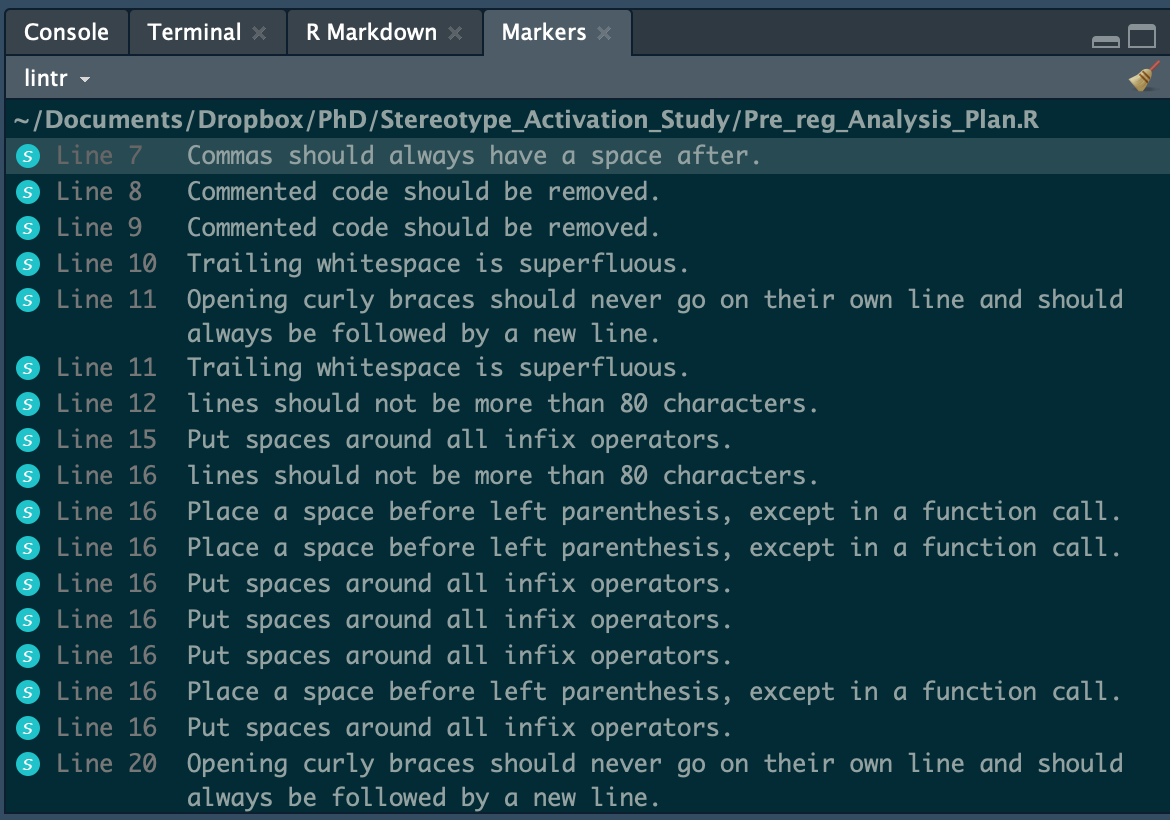
Figure 1:An example of how the lintr output may look like for an input file with R code.
For more details, please visit the GitHub repository.
Autopep8 (Python)
Autopep8 is a Python module that can be run from the terminal and automatically formats a file to pycodestyle (formerly called pep8) guidelines.
It is available on pypy and can be installed using pip.
# Install autopep8
pip install --upgrade autopep8
You can modify a file in place by running the following command:
autopep8 --in-place --aggressive --aggressive <filename>To some extent, the module can also be used on R scripts!
Black (Python)
Black is an auto-formatting package for Python. This means that it will automatically change your code to adhere to certain guidelines, like spaces around operators and removing unnecessary whitespace. It is also consistent, so that the code that you and your collaborators work on will look the same once black formats it. It does not change what the code does. This can reduce the time spent making the above changes to the code.
Static Code Analysis Tools
Static code analysis tools examine code and detect software vulnerabilities before your code is executed or the project is built and deployed. In addition to finding bugs, many of these tools can also help maintain a consistent coding style.
Some of the most widely used static analysis tools are mentioned in the table below:
| Language | Static code analysis tool |
|---|---|
| C/C++ | Cppcheck, cpplint |
| Python | Pylint, prospector |
| Javascript | ESLint, JSlint, JSHint |
| Java | Checkstyle, FindBugs, PMD |
| Perl | PerlTidy |
| R | lintr |
| Shell/Bash | shellcheck |
Online Services Providing Software Quality Checks
There are several web services that analyse code and make the quality of the code visible. Usually these services run one or more static code analysis tools that can also be used from the command line or integrated into your editor on your own computer. Using a code quality service that integrates with a GitHub/GitLab repository is highly recommended, as it can detect and communicate quality issues in pull requests.
Code quality analysis services are websites that often offer the following features:
Automatically analyse your code after pushing it to GitHub/GitLab
Usually free for open source projects
Support multiple programming languages, but not every language will have the same level of features
Grade or score for the quality of all of the code in the repository
List of issues with the code, grouped by severity
Drill down to location of issue
Default list of checks which the service provider finds the best practice
Can be configured to make the list of checks more strict or relaxed
Can be configured to ignore files or extensions
Can read a configuration file from repository
Track issues over time and send alerts when quality deteriorates
Optionally reports on code coverage generated by a CI build
Automatically deploy the repository and generates a preview build for review before final release.
For a list of choices see shields.io or this list of services that are free for open source projects.